So, what does it really mean to map your sales process?
It’s about creating a living, breathing blueprint of every single step, touchpoint, and decision that happens from the moment a lead enters your world to the moment a deal is signed. This isn’t just a document; it’s the official playbook for your entire revenue team. It’s what turns random acts of selling into a predictable, high-performance engine for growth.
Why a Sales Process Map Is Your Revenue Playbook

Let’s be honest for a second. An undefined sales process is just organized chaos. When every rep does their own thing, you get wildly inconsistent messaging, promising leads falling through the cracks, and sales forecasts that feel more like wishful thinking than actual data. You’re constantly reacting, and every deal is a brand-new, unpredictable adventure.
Mapping your sales process is the single most powerful thing you can do to bring order to that chaos. It’s about building the foundational blueprint for scalable revenue. This map becomes the single source of truth, guiding every interaction and decision your team makes.
From Unstructured Chaos to Predictable Clarity
The shift from an ad-hoc, “wing it” approach to a clearly defined map is game-changing. Here’s a direct comparison of the business impact when you move from an unstructured approach to a clearly mapped sales process.
The Difference Between a Mapped vs. Ad-Hoc Sales Process
| Business Area | Ad-Hoc Process (Chaos) | Mapped Process (Clarity) |
|---|---|---|
| Onboarding | New reps take months to ramp, relying on “tribal knowledge.” | New hires follow a clear playbook and become productive in weeks. |
| Forecasting | Pipeline reviews are based on gut feelings and “happy ears.” | Forecasts are built on tangible deal stages and predictable win rates. |
| Customer Experience | Inconsistent and confusing. Prospects get a different story from every rep. | Professional and uniform. Every prospect gets a consistent, trustworthy journey. |
| Efficiency | Reps waste time on low-value tasks and reinventing the wheel. | Automation and clear steps allow reps to focus on high-value selling activities. |
| Scalability | Growth is unpredictable and difficult to replicate. | Revenue becomes a predictable science, ready to scale with confidence. |
As you can see, a well-documented process gives everyone a common language and a clear path to follow. It removes the ambiguity that kills deals and empowers your team to focus on high-value activities instead of just figuring out what to do next.
Reclaiming Valuable Selling Time
One of the biggest hidden costs of an unmapped process? Wasted time.
Sales reps historically spend only about 30% of their workweek actually selling. The rest is eaten up by administrative tasks and busywork. A well-mapped process, especially when you start layering in smart automation, cuts through that noise. You can dive deeper into these sales automation statistics and how they can help your team.
By defining the what, when, and how of your sales motion, you eliminate guesswork. Reps no longer waste cycles reinventing the wheel for every opportunity. Instead, they execute a proven playbook, which frees up mental energy and time for building relationships and closing deals.
Ultimately, mapping your sales process isn’t some theoretical exercise for managers—it’s an essential, practical tool for the entire organization. It creates the operational backbone you need to scale revenue predictably, turning your sales function from a chaotic art form into a measurable science.
Uncovering How Your Team Actually Sells
First things first: before you can design a killer sales process, you have to get brutally honest about the one you have right now. The good, the bad, and especially the ugly.
If you try to map a process based on assumptions or how you think things should work, you’re setting yourself up for failure. This isn’t just a box-ticking exercise. It’s detective work to find out what’s really happening on the ground—how deals are actually won and lost.
Your mission is to look past the official sales playbook. You need to see the real-world workflows, the clever shortcuts your team has invented, and the biggest points of friction they hit every single day. Only then can you build something that’s based on reality, not theory.
Start with Your Star Performers
So, where do you begin? With your top sales reps. Always.
These are the people who have cracked the code, usually through a ton of trial and error. They’ve built their own little systems, found workarounds for clunky tools, and they understand your customer’s buying journey better than anyone else in the building.
When you sit down with them, your only job is to listen and learn. Don’t critique. Just be genuinely curious. Frame the conversation as you trying to bottle their secret sauce so everyone can benefit. This immediately builds trust and gets them to open up.
Top performers are masters of creating effective but undocumented processes. Your goal is to pull out this “tribal knowledge” so you can standardize the best parts and lift the entire team’s game.
Asking the Right Questions
Vague questions get you vague answers. If you want the real story, you need to ask specific, open-ended questions that get them talking. You want them to walk you through their world, step-by-step.
Here are a few questions I’ve found work wonders:
- “Walk me through the last deal you closed. Start from the absolute beginning.”
- “Where does most of your non-selling time go? What are those soul-crushing tasks?”
- “At what point in a deal do you just know it’s going to close? What’s the trigger?”
- “What’s one piece of information you wish you had way earlier in the sales cycle?”
- “When a deal goes dark, where does it usually happen? What’s the common thread?”
These questions get you past the surface-level process and into the real behaviors, tool frustrations, and challenges that define their day.
Expand the Investigation to Managers and Support Roles
Reps give you the view from the trenches, but sales managers see the battlefield from a different vantage point. They spot the patterns—which reps get stuck at certain stages, where handoffs between teams are fumbled, and why forecasts are consistently off.
A manager might tell you something an individual rep would never see, like how 80% of stalled deals get stuck right after the first demo. That’s a huge red flag pointing to a problem with qualification or how you’re communicating value.
And don’t stop there. It’s absolutely crucial to talk to the other teams that touch the sales process. Think Sales Development, Solutions Engineering, Customer Success, and even Finance. These folks have a totally unique perspective on process gaps and bottlenecks. For a deeper dive, check out how a solid revenue operations team structure is the glue that holds this cross-functional alignment together.
By interviewing everyone involved, you get the complete picture. This ensures your final map accounts for every single touchpoint and dependency in your company’s revenue engine.
Turning Interviews into an Actionable Sales Blueprint
Alright, you’ve done the hard work on the ground, talking to everyone from the top-performing reps to the newest BDRs. Now it’s time to take all those notes, anecdotes, and “aha!” moments and turn them into a structured, visual blueprint for your sales process.
Think of yourself as an architect. You’re moving from conversations and sketches to a formal plan that everyone can follow. This isn’t just about listing a few stages; it’s about building a predictable path that guides reps, informs leadership, and creates a smoother journey for your customers.
This initial design phase is all about visualization and definition before you ever touch a single setting in your CRM.
This is the core loop you’re formalizing: Observe, Interview, and now, Document.
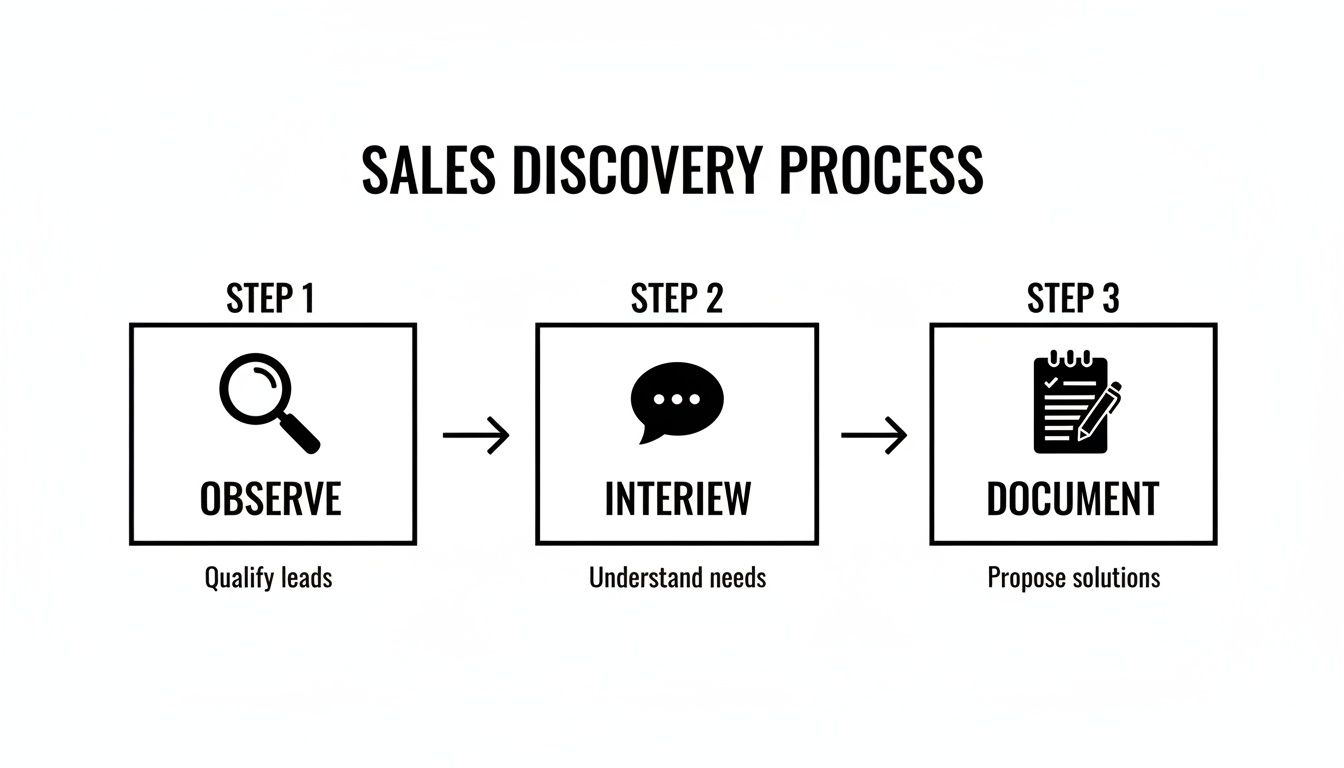 This visual is a great reminder that a solid blueprint starts with a deep understanding of what’s actually happening today, not just what you wish was happening.
Defining Concrete Entry and Exit Criteria
Here’s where the magic really happens. Vague stage names like “Qualification” or “Proposal” are useless without crystal-clear rules of engagement. The absolute most critical part of mapping the sales process is defining the non-negotiable entry and exit criteria for every single stage.
It all boils down to answering two simple but powerful questions for each step in your sales cycle:
- Entry Criteria: What must be true for a deal to officially enter this stage?
- Exit Criteria: What specific actions must be completed—and what information captured—before a deal can move forward?
These rules are your defense against “happy ears” and wishful thinking in the pipeline. They ensure that a deal’s stage reflects its true progress, not just a rep’s optimism. This structure is a game-changer for business intelligence. In fact, research shows that structured sales processes have boosted forecast accuracy for 51% of teams, and 42% saw better team performance overall. You can dig into more stats about how structured processes impact sales outcomes.
Blueprint Example: The High-Velocity Transactional Sale
Let’s start with a common scenario: a high-velocity, transactional sales motion for a SaaS product. The deal size is smaller, the cycle is short, and the process needs to be lean and mean.
Stage: Qualified Lead
- Entry: A new lead comes in from a “Request a Demo” form on the website.
- Exit: The rep holds a discovery call, confirms BANT (Budget, Authority, Need, Timeline), and logs the call notes in the CRM. The “Next Step” field must be updated with the date of the scheduled demo.
Stage: Product Demo
- Entry: The discovery call is marked “Complete” and BANT is confirmed.
- Exit: The product demo is done. The prospect confirms the solution meets their needs, and the rep checks a custom “Pain Point Confirmed” box in the CRM.
See how simple that is? It’s a checkbox-driven process that ensures basic qualification happens before a deal eats up more resources. The exit criteria are clear, binary actions that are easy for reps to follow and dead simple to track.
A great sales blueprint isn’t overly complicated. It should be just robust enough to ensure consistency and data quality without burying your sales team in administrative tasks. The goal is guidance, not governance by a thousand clicks.
Blueprint Example: The Complex Enterprise Deal
Now, let’s flip the script and look at a complex, six-figure enterprise sale. This beast involves multiple stakeholders, technical deep dives, and a much longer sales cycle. Your blueprint needs more gates and validation points to match.
Stage: Technical Validation
- Entry: The economic buyer has given a verbal nod on budget, and your internal champion has connected you with their technical team.
- Exit: Your solutions engineer completes a successful proof-of-concept (POC). Crucially, the technical stakeholders must sign off on the pre-defined POC success criteria document, and that PDF must be attached to the opportunity record in the CRM.
Stage: Procurement and Legal Review
- Entry: The economic buyer has given a firm “yes,” and your champion has made a formal introduction to their procurement and legal departments.
- Exit: The Master Service Agreement (MSA) has been redlined by both sides. All revisions are approved, and the final contract is officially out for signature.
In this world, the exit criteria involve tight collaboration with other departments (like solutions engineering and legal) and demand tangible proof—a signed document, not just a promise. This is what prevents deals from jumping to the “Closing” stage based on a handshake, which in turn makes your sales forecast something you can actually trust.
By designing a blueprint with these clear, verifiable milestones, you build a process that reflects the reality of the sale, whether it takes three weeks or nine months to close.
Bringing Your Process to Life Inside Your CRM
A beautifully designed process map is just a pretty picture until it lives and breathes inside your CRM. This is where the rubber meets the road—where your blueprint becomes the daily reality for your entire sales team. The goal is simple: make following the right process the easiest, most logical path for every single rep.
This isn’t just a copy-and-paste job. You’re thoughtfully translating business logic into the very fabric of your CRM—its objects, fields, and automations. When you get this right, the CRM stops being a passive database and starts acting as an active coach on every single deal.
Translating Stages into Actionable Workflows
First up, you need to configure your opportunity stages to perfectly mirror the blueprint you’ve worked so hard on. Each stage in your CRM must directly correspond to a major milestone from your process map. But just naming the stages isn’t enough; you have to build the guidance right into the workflow.
Most modern CRMs let you add stage-specific prompts or “key fields” that appear when a rep enters a new stage. This is your golden opportunity to embed your exit criteria directly into their daily grind.
For example, when an opportunity hits the “Technical Validation” stage, you can have your CRM immediately prompt for:
- POC Success Criteria Doc Attached? (A simple checkbox is perfect here)
- Technical Stakeholder Sign-Off Date (A date field to capture the official nod)
- Primary Technical Contact (A lookup to the key person on their side)
This simple setup turns abstract rules into a concrete checklist, making it crystal clear what needs to happen before the deal can move forward.
The real secret here is making the right action the easy action. Instead of forcing reps to hunt down a playbook or remember rules from a training session, build the rules directly into the tool they use all day, every day. That’s the key to driving adoption.
Using Validation Rules as Guardrails
Validation rules are your best friend for enforcing your process and keeping your data clean. Think of them as automated guardrails that prevent reps from skipping critical steps. This is how you make your exit criteria non-negotiable.
Let’s walk through a classic, high-impact scenario. Your process map clearly states you can’t move to the “Proposal/Quote” stage until the economic buyer has been identified and documented.
A validation rule makes this law. It would fire an error message if a rep tries to advance the stage to “Proposal/Quote” while the “Economic Buyer Identified” checkbox is still unchecked. The message can be friendly but firm: “Hold up! Please identify and confirm the Economic Buyer in the contact roles before creating a proposal.”
This one rule instantly prevents reps from sending proposals to people who can’t sign and stops pipeline inflation in its tracks. It’s a simple, powerful way to focus your team’s effort where it matters most. But use them wisely—remember that one of the core goals of a CRM is to empower users, not box them in.
Automating the Administrative Burden
Finally, a well-mapped process inside your CRM should reduce manual work, not create more of it. This is where smart automation comes into play. Look for any repetitive, low-value tasks that can be triggered automatically based on stage changes or field updates.
Even simple automations can have a massive impact:
- Task Creation: An opportunity moves to “Negotiation”? Bam. A task is automatically created for the sales manager to review the deal terms.
- Notifications: A deal is marked “Closed Won”? A Slack notification instantly hits the #wins channel to celebrate and alert the Customer Success team.
- Field Updates: The “Technical Sign-Off Date” is filled in? The system automatically updates a “Deal Status” field to “Ready for Commercials.”
This kind of automation ensures smooth handoffs between teams and keeps deals from stalling out. It frees your reps to focus on what they do best—selling—while the administrative details hum along in the background. High-performing teams are masters at this. In fact, 50% of them measure their efficiency by conversion rates, and they consistently use automation to nail every stage. You can see how top teams leverage sales automation and get a real edge.
By blending clear stages, smart validation, and helpful automation, you transform your sales process map from a static document into a dynamic, intelligent system that actively guides your team to success.
Measuring the Health of Your Sales Process
 A sales process that isn’t measured is just a set of good intentions. Now that your map is live in your CRM, it’s time for the most critical step: instrumenting it to actually track performance. This is where you graduate from theory to results, finally getting the hard data you need to spot bottlenecks and prove your new system works.
The whole point is to build dashboards that your leadership and sales reps can actually trust. That means capturing key stage changes, calculating conversion rates between each step, and getting a real handle on your sales cycle length. Without this, you’re just flying blind.
Capturing the Metrics That Matter
The good news is your process map gives you the perfect framework for defining your key performance indicators (KPIs). Instead of grabbing generic metrics, you can now measure the health of each specific stage you’ve worked so hard to define. This is how you get a truly granular view of what’s working and what isn’t.
I always recommend starting with three core categories of metrics. Together, they tell the complete story of your sales motion’s effectiveness.
- Conversion Rates: What percentage of deals successfully move from one stage to the next? For instance, what’s your conversion rate from “Technical Validation” to “Procurement Review”? This is how you find exactly where deals are stalling out.
- Sales Cycle Length by Stage: How long, on average, do deals sit in each stage? Knowing a deal spends 35 days in legal review versus just 5 days in qualification tells you precisely where to focus your process improvement efforts.
- Overall Deal Velocity: This is the ultimate health score for your entire process. It combines your win rate, average deal size, and sales cycle length to show how much revenue is moving through your pipeline over a given period.
If you need some inspiration for your own dashboards, check out these essential examples of sales KPIs for high-performing teams.
Building a data-driven culture starts with providing clear, reliable metrics that are directly tied to the sales process everyone follows. When reps see how their daily activities impact the numbers, the process map becomes a tool for their own success, not just a management mandate.
This isn’t just a “nice-to-have” anymore. Globally, 66% of US sales leaders are creating specific processes for B2B sales, where digital channels now account for 80% of engagements. With B2B cycles averaging a lengthy 84 days and involving over 10 stakeholders, precise stage-by-stage measurement is non-negotiable.
Validating Your Data with a Testing Runbook
Before you unveil your new analytics dashboards to the whole company, you absolutely must ensure the data is accurate. Trust me, making decisions on flawed data is far worse than having no data at all. This is where a simple testing runbook saves the day.
A runbook is basically just a checklist you follow to validate that your CRM instrumentation is firing correctly. The process is simple: create a test opportunity and manually push it through every single stage of your sales process, from creation all the way to “Closed Won.”
After each stage change, pop over to your analytics platform and verify the data is showing up correctly.
- Stage Movement: Did the stage-change event get recorded with the correct timestamp?
- Field Updates: Are the custom fields you updated (like “Economic Buyer Identified”) reflected in the data warehouse?
- Calculations: Are your dashboards correctly calculating the time spent in the previous stage?
This methodical check ensures that when you present your first performance review, you can stand behind the numbers with total confidence. It’s a small step that builds immense trust in your newly mapped sales process and the powerful insights it generates. This rigor is what turns your sales map from a document into a true revenue-driving asset.
Keeping Your Sales Process Sharp and Relevant
So, you’ve mapped your entire sales process. Great job. But here’s the thing: it’s not a “set it and forget it” kind of project.
Your market, your customers, and your own business are always shifting. What works today might be a liability tomorrow. If you let your process map gather dust, it’ll quickly become a historical document instead of the strategic playbook you need. The goal is to keep it alive and breathing.
This doesn’t mean you need a mountain of bureaucracy. A simple, lightweight governance plan is all it takes to keep things on track. It’s about finding that sweet spot between giving your reps a consistent framework and allowing for the flexibility to adapt.
Finding a Rhythm for Governance
The best way I’ve seen this handled is with a small, cross-functional committee. Pull in a key person from sales, someone from marketing, and definitely a voice from operations. Their job is to be the gatekeepers—reviewing change requests, looking at the data, and giving a thumbs-up or thumbs-down to updates.
To make this work, you need a regular cadence.
- Quarterly Process Check-in: Get everyone in a room (virtual or otherwise) once a quarter. This is your chance to really dig into the dashboards. Are deals suddenly stalling out at the “Proposal” stage? Did the sales cycle for your flagship product just jump by ten days? These are the kinds of questions you should be asking.
- The Annual Deep Dive: Once a year, it’s time for a more thorough audit. Go back to your top-performing reps and managers. Sit down with them and find out what’s really happening on the ground. You’ll uncover new best practices and pinpoint the friction points that have crept in over the last twelve months.
A formal review cadence turns process management from a reactive fire drill into a proactive, strategic part of your operation. It ensures your sales map reflects how your team actually wins deals now, not how they did it a year ago.
Don’t Forget Training and Continuous Improvement
As your process changes, you have to bring your team along for the ride. Nobody likes a surprise new field in the CRM or a sudden change to stage-gate criteria.
Create simple, easy-to-digest training materials. Think one-page summaries of what’s new or a quick video walkthrough from a sales leader. Stick them in a central spot—your company wiki, a shared drive, whatever—so new hires can ramp up correctly and veterans have a place to reference.
This commitment to keeping everyone on the same page is a massive advantage. Seriously. When you see that 92% of leaders depend on team collaboration to keep processes fresh and 88% agree consistency is key for good training, you realize how critical this is. A well-maintained map becomes a core part of protecting your revenue, especially in a market like North America, which holds 41.2% of the sales force automation share.
If you want to dig deeper, check out this great resource on how process and automation drive success in top sales teams.
A Few Common Questions I Get About Sales Process Mapping
Even with the best plan, mapping out your entire sales process can feel a little daunting. People often run into the same handful of questions, so let’s tackle them head-on with some practical advice from the field.
How Often Should We Revisit Our Map?
Think of your sales map like a living document, not a stone tablet. A good rhythm is to give it a formal look-over quarterly and pencil in a more serious deep dive annually. This keeps you ahead of any small deviations before they snowball into major data problems.
That said, don’t just wait for the calendar reminder. Certain business triggers should send you straight back to the drawing board. You’ll want to immediately reassess your map anytime you:
- Roll out a significant new product or service.
- Push into a new market or region.
- See a major shift in who your ideal customer is.
What’s the Single Biggest Mistake People Make?
Easy. Building the process in an ivory tower. When leadership or an ops team designs a “perfect” process on paper without talking to the reps on the front lines, it’s dead on arrival.
I’ve seen it happen time and again. The new process doesn’t reflect how real conversations actually unfold. Before you know it, reps are creating their own workarounds in spreadsheets, your CRM data is a mess, and all that hard work goes down the drain. Always, always start by interviewing your team.
The whole point is to document and improve the process that’s actually happening, not to force an imaginary one on people. A map nobody follows is just a pretty picture.
Do We Need More Than One Sales Process Map?
Yes, almost certainly. Trying to shoehorn every deal into a single, one-size-fits-all process is a recipe for frustration. The way you sell a simple, high-velocity product is completely different from how you navigate a complex, six-figure enterprise deal with a dozen stakeholders.
Your maps need to reflect your go-to-market reality. You might have a common high-level framework—say, the same major stages—but the nitty-gritty details like specific activities, exit criteria, and timelines should be customized for each unique sales motion or team. This makes the map a genuinely useful tool for everyone, not just a generic corporate guideline.
At RevOps JET, we’re the ones who build the technical plumbing that makes your sales process actually work. Our on-demand revenue operations engineers handle everything from CRM architecture and data pipelines to robust API integrations. We turn your map into a reliable, automated engine for growth. See how we can help you build a process you can trust.